- Startseite /
- Büroprodukte /
- Büro- & Schulbedarf /
- Writing & Correction Supplies /
- Technical Drawing Supplies /
- Templates /
- Computer Shortcuts: QuickStudy Laminated Refe...
0 ratings


Artikelnr.:
57413616
Computer Shortcuts: QuickStudy Laminated Reference Guide (Quick Study Computer)
89% der Befragten würden dies einem Freund empfehlen
Artikelnr.:
57413616
€ 16
Price Details
Ohne Versand- und Zollkosten ( Versand- und Zollkosten werden an der Kasse berechnet )
*Alle Artikel werden aus USA importiert
0 ratings
Schreiben Sie eine Bewertung
Auf Lager
 Vom USA Store für Sie importiert
QTY:
Nur noch 5 Artikel auf Lager.
Bestellen Sie jetzt und erhalten Sie es am Freitag, Oktober 16
Gesicherte Transaktion
Ubuy ist bestrebt, Ihre Sicherheit und Privatsphäre zu schützen. Unser fortschrittliches Zahlungssicherheitssystem gewährleistet Vertraulichkeit, indem Ihre Daten während der Übertragung mit AES (Advanced Encryption Standards) und SSL (Secure Socket Layer) Protokollen verschlüsselt werden. Ihre Zahlungsdaten sind 100% sicher, da wir Ihre Zahlungsdaten nicht an Drittanbieter weitergeben.
Unsere besten Logistigpartner


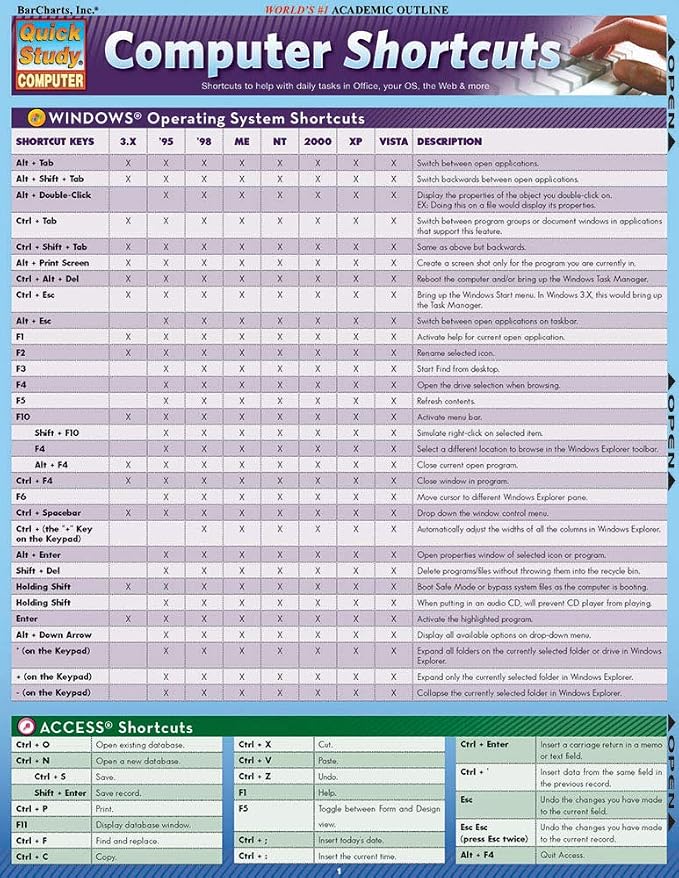
This 2-panel (4-page) guide points out helpful shortcuts that can be found within the most popular Windows PC and Apple Macintosh software.

Fast
Shipping

Kostenlose
Rücksendung*

Sichere Verpackung

100 % Originalprodukte

PCI DSS-Standards

ISO 27001-zertifiziert



Note: Step Down Voltage Transformer required for using electronics products of USA store (110-120). Recommended power converters Jetzt kaufen.


Besondere Merkmale
Comprehensive Coverage
This guide includes an extensive list of computer shortcuts across various software, making it an essential tool for improving productivity and efficiency in both personal and professional settings.
Durable Material
Made from high-quality laminated material, this reference guide is resistant to wear and tear, ensuring longevity and protection against spills and stains for repeated use in busy environments.
Portable Design
The compact pamphlet format allows for easy transportation, making it convenient to reference while working on-the-go, ideal for students, professionals, or anyone looking to boost their computer skills.
Produktdetails
- 2-panel (4-page) guide for saving time while using Windows PC and Apple Macintosh software
- Points out helpful shortcuts for Windows Operating System, Access, FrontPage, PowerPoint, Publisher, QuarkXPress, InDesign, Quicken, UNIX/Linux, Internet Explorer, Mozilla Firefox, Opera, Apple Macintosh
- Includes special character shortcuts for word processing
- Useful for surfing the Web and balancing virtual checkbooks
- Published in September 2008
- Part of the Quick Study Computer Misc. Supplies series
Product Technical Details
| Manufacturer | QuickStudy |
| Brand | QuickStudy |
| Item Weight | 1.44 ounces |
| Product Dimensions | 8.5 x 0.06 x 11 inches |
| Number of Items | 1 |
| Manufacturer Part Number | 9781423205432 |
Für wen ist das Produkt geeignet?

-
Students
Helpful for students learning computer software, providing quick reference to essential shortcuts for efficient study.
-
Office Workers
Ideal for office professionals needing quick access to keyboard shortcuts to enhance productivity and streamline tasks.
-
Beginner Users
Great for newcomers to computers, helping them quickly learn and memorize essential shortcut keys for various applications.

-
Advanced Users
Not suitable for advanced users who already know shortcuts, may find it too basic and lacking in depth.
PRODUKTBESCHREIBUNG
Haben Sie eine Frage? Mit uns chatten
Kundenfragen und -antworten
-
Frage:
Wie kaufe ich Computer Shortcuts: QuickStudy Laminated Reference online bei Ubuy ein?
Antworten: Es ist ganz einfach, Computer Shortcuts: QuickStudy Laminated Reference online bei Ubuy einzukaufen.. Sie müssen nur nach dem Produkt suchen, beim Bezahlen Ihre Versandart auswählen und es an Ihren Standort liefern lassen. -
Frage:
Ist Computer Shortcuts: QuickStudy Laminated Reference in Luxembourg zum Online-Shoppen verfügbar?
Antworten: Ja, bei Ubuy Luxembourg können Sie dieses Produkt zu einem angemessenen Preis kaufen.. Das Computer Shortcuts: QuickStudy Laminated Reference ist lokal nicht verfügbar, aber Sie können uns unseren Expressversandservice anvertrauen. -
Frage:
Wie lange dauert es nach der Bestellung, bis ich das Produkt erhalte?
Antworten: Die Lieferzeit Ihres bestellten Produkts hängt davon ab, was Sie bestellt haben und welche Versandart Sie gewählt haben.. Die voraussichtliche Lieferzeit wird während des Bestellvorgangs angegeben. Seien Sie also beim Einkaufen unbesorgt.
QuickStudy Templates Editorial Review
Customer reviews for the Computer Shortcuts Quick Study Computer Misc. Supplies are mixed. While some customers find it to be a very useful and affordable product with good information, others find it to be outdated and not helpful at all. It is worth noting that some reviews mention that the product was last updated for windows VISTA 2007, which makes it quite old. However, others appreciate the convenient shortcut collection and find it handy to keep nearby. Overall, if you have an older Windows operating system and are looking for a quick reference guide to computer shortcuts, this product may be worth checking out. However, if you have a more recent operating system, it is probably best to find a more up-to-date resource.
Kundenbewertungen
236 Kundenbewertungen
-
5 Sterne
76%
-
4 Sterne
13%
-
3 Sterne
8%
-
2 Sterne
0%
-
1 Sterne
3%
Bewerten Sie dieses Produkt
Teilen Sie Ihre Meinung mit anderen Kunden
Vorteile
- Very affordable
- Convenient shortcut collection
- Handy to keep nearby
- Good information for study
Nachteile
- Outdated for newer Windows operating systems
Produktpreisverlauf
Wichtige Information
- Einschränkungen: Für international versandte Produkte beachten Sie bitte, dass jegliche Herstellergarantie nicht gültig sein könnte; Herstellerservice-Optionen nicht verfügbar sein könnten; Produkthandbücher, Gebrauchsanleitungen und Sicherheitshinweise nicht in der Sprache des Ziellandes verfasst sein könnten; die Produkte (und Begleitmaterialien) könnten nicht im Einklang mit den Standards, Spezifizierungen und Etikettierungsvorgaben des Ziellandes entworfen sein; und die Produkte könnten nicht der Voltzahl und anderen elektrischen Standards des Ziellandes entsprechen (weshalb, falls zutreffend, die Verwendung eines Adapters oder Umwandlers erforderlich sein könnte). Der Empfänger ist dafür verantwortlich sicherzustellen, dass das Produkt legal in das Zielland importiert werden kann. Bei der Bestellung von Ubuy oder seinen Partnern ist der Empfänger der eingetragene Importeur und muss sich an alle Gesetze und Regulierungen des Ziellandes halten.
- Nicht alle auf Ubuy aufgeführten Produkte werden zum Verkauf angeboten, da Ubuy eine globale Suchmaschine ist. Produkte unterliegen Export-/Handelsbestimmungen.
€ 16
Bestellen Sie jetzt und erhalten Sie es am Freitag, Oktober 16
Dieser Artikel unterliegt in meinem Land keinen Beschränkungen. (Klicken Sie bitte auf den obigen Link, wenn dieser Artikel in Ihrem Land keinen Beschränkungen unterliegt. Unser Team wird ihn dann prüfen und zulassen.)
QTY:
Nur noch 5 Artikel auf Lager.
Gesicherte Transaktion
PCI DSS compliant and ISO 27001:2022 certified, with encrypted payments and full buyer protection on every order.
Unsere besten Logistigpartner
Schnellste grenzüberschreitende Lieferung
Merkmale und Vorteile
- Find helpful shortcuts for the most popular Windows PC and Apple Macintosh software
- Saves time while surfing the web or balancing a virtual checkbook
- Includes special character shortcuts for word processing.
Ubuy Assurance
Experience worry-free shopping with 100% original products, PCI DSS-compliant payment security, ISO 27001-certified data protection, the fastest cross-border delivery, free returns *, and secure packaging on every order.